The evening before
Mode 01Tour preparation
Not just your existing clients: the Companion looks for new addresses along the route that are worth your time and builds the optimised route around them. Ready-made Maps links included.
salesCOMPANION · your daily companion in the field
Your salesCOMPANION from VYYNU sits with you in the car or works alongside you at the laptop. It listens whenever you need it, remembers everything, researches new leads overnight, plans and refines tours with you and writes your finished report in the evening, just the way you need it.
No CRM, no spreadsheet. Your memory stays with you, on your server.
Everything stays in memory, on your own server.
Prepare, capture, wrap up, dig deeper, and take stock on Sundays.
The evening is yours again.
You talk, it sorts.
Limits first
Many AI agents are given access to everything and are then supposed to stick to rules. Your salesCOMPANION gets its limits first, in the code. You stay in control.
The evening after
21:40, hotel room. On your phone: 40 photos, 5 business cards and a mess of notes.
On the laptop: an empty CRM form with 18 mandatory fields. You still know exactly what the buyer said at lunchtime. But which field does that go in? So you type the bare minimum, hit save, and the rest of the day disappears. There is no field for what you actually experienced.
The problem with CRMs is the moment you're meant to fill them in: in the evening, tired, from memory.
Features
The evening before
Mode 01Not just your existing clients: the Companion looks for new addresses along the route that are worth your time and builds the optimised route around them. Ready-made Maps links included.
In the car park
Mode 02Speak it in right after the appointment, still in the car park. Photos, business cards, the undertones: everything lands with the right client. No “I can't put that in the CRM like this”. No self-censorship. And when you finish a call on the road: one spoken sentence, and it's in, whether car, home office or desk.
Speak it in. Done.
Over dinner
Mode 03In the evening your Companion asks whether the day is all in. One word from you, and the Field Report is done. Back at the table, you read it through instead of typing it.
Next morning
Mode 04While you sleep, the Companion digs deeper: Reddit threads, forums, scene lists, local newsrooms. Fresh leads, with website, Instagram profile, e-mail address and a short summary, are on your screen and in your dashboard from 07:00.
Once a week
Mode 05 · coming soonOnce a week a report on your market, researched for your industry and your interests, with sources. What's on your mind decides what's in it.
Sounds like your working day, just different?
See the pricingThe research
The good addresses are rarely on page 1. They're in a Reddit thread, in a scene list, in a prospect's Instagram feed, in the local paper's piece on a new opening. That's exactly where the Companion looks.
Reports
1day
Daily · for youWhat really happened today, in your words, not in mandatory fields.
30days
Monthly · for the company · coming soonAggregated and anonymised: the sum of your days, not your individual appointment.
You don't write a single extra line.
The report takes shape as you go.
365days
Yearly · yours alone · coming soon · sample figuresAt the end of the year the Companion takes stock from your voice notes, photos and reports: where you were, with whom, what came of it. It belongs to you alone.
Speaking and writing
No app from the store. Any device, any browser. Set up together once, done.
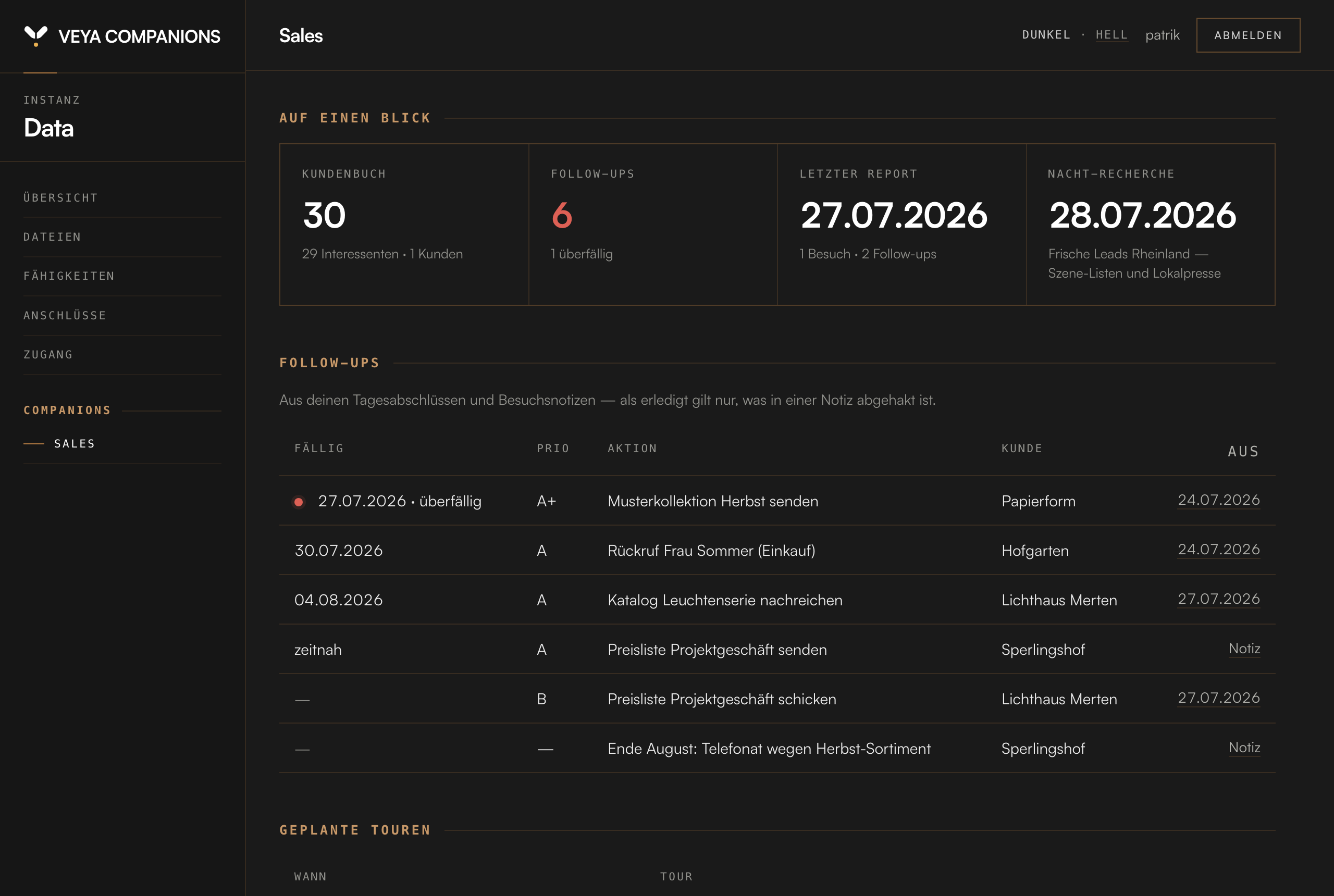
On the road you talk to your Companion in Telegram or Signal, in the car or between two appointments. At the desk you write to it straight in the dashboard. Reports, clients and leads land on your server and appear instantly, wherever they come from. It runs on every operating system and in every modern browser: Windows, Mac, iPhone, Android, the same dashboard everywhere. And it can look like an app everywhere, if you like: on your phone's home screen, in the dock or taskbar on your computer. Its own icon, full screen without the browser bar.
Voice stays with the phone, nobody types in the car. At the computer, writing is faster than talking. And what your Companion is called is up to you: this one's called Data.
Quick ask or skill
With an AI chat, every task is a quick ask, called out anew every time, and every time you get a slightly different result, depending on how well you phrased it today. Your Companion works differently: preparing tours, capturing notes, writing the report, researching overnight: those are fixed skills. Defined once, cleanly, and tested, they always run in full and always the same way, on their own if you want.
Other AI tools stay the intern on day one, who needs everything explained again every time. Yours becomes the trained colleague, with your routines, not just anyone's.
The base is built in
The salesCOMPANION stands on a broad base: all the fundamentals are on board: reading e-mails and drafting replies on request, keeping several calendars, searching the web, understanding photos and receipts, listening and answering with a voice. The field-sales skills come on top.
Security & data
Let's say it straight instead of printing “100% local” on a poster: for thinking, and for understanding your voice notes, the Companion uses large language models. Those don't run on your phone, and nobody can seriously claim that today.
What stays with you is the part that matters: the memory. Your clients, notes, photos, history and relationships live on your server. What goes out for a single answer goes out as an excerpt, not as your archive. No tracking, no analytics, no silent syncing in the background.
Thinking via LLM. Memory on your server. That difference is the whole point.
What it may not do, it cannot do. Your data stays on your server. As a customer you can inspect every line of code on your server. No surprises in the small print.
The private memory
The Companion remembers what you tell it: names, preferences, decisions, the small details that otherwise get lost.
Everything you tell it lands in a private memory, with no form, no folder, no effort. You talk, it files.
Personal knowledge lives in its own private space, set apart from the Companion's work knowledge. What's private stays private.
It doesn't share, send or publish your private memory. So that it knows you, a short summary goes to the language model with every request. It only fetches older memories when it needs them for an answer.
Anchored in the code: it only writes to your chat, it only sends emails and invitations once you say so, and it can neither download nor run programs from the internet.
Setup
We set up VYYNU salesCOMPANION together with you on your server, in person, on a shared screen. Beforehand you get a short preparation note by e-mail. You can see in advance what's involved. If you like, we bring your existing client data across from a common export format such as CSV or XLSX. After that your Companion runs on its own: no IT department, no tech gobbledygook.
We want the start to stick.
Pricing
One product, everything in. Alone or as a team: no bundles, no surcharges, no hidden fees.
1,500 €/ year
for the single seat
equals 125.00 € a month
2,500 €/ year
for teams up to 3 seats
equals 208.33 € a month
Each additional seat 500 € a year, equals 41.67 € a month · 12-month minimum term · plus VAT.
Try it for 30 days, or your money back.
The contract starts with the setup, and payment starts then. During the first 30 days you can cancel at any time and get your money back. The twelve-month minimum term counts from the setup. You can pay yearly or monthly. After the minimum term the contract renews for another year each time, cancellable with one month's notice to the end of the term.
Starting with the whole team? Then begin with a pilot project at a fixed price, set up together, with a success criterion we agree on beforehand. It ends with a decision, and if you go ahead, the pilot fee is credited against your first year.
Get in touchCommon questions
An AI agent for field sales, your personal companion in the day-to-day of selling. It prepares tours, takes your spoken notes after appointments, writes your report in the evening and researches new clients at night. No CRM. No forced cloud. A helper that lives on your own server.
For field reps, sales agents and sales teams in small and mid-sized companies, from the lone rep to the whole sales team. In short: for anyone who wants an AI agent that takes the paperwork off their hands, with the client data staying on their own server. And if your day isn't made of client appointments but of building sites, a workshop or expert reports, the xCOMPANION is yours: the same core, your skills, developed together. The first briefing is free.
A CRM thinks in records. The salesCOMPANION thinks in your working day. You speak in, it does the rest. No dropdowns, no mandatory fields, no “please complete all fields”.
In principle yes, if your CRM offers an interface. Whether and how we connect it, we clarify with you before setup. It also works without a connection: for your working day the Companion replaces the CRM, and during setup we take over your existing client data from a common export format such as CSV or XLSX.
Always the model that, in our view, is currently the best and most up to date for the Companion. We check the market daily for what can be improved in cost and capability. Access runs through OpenRouter, a service that lets you use many models with one account. Every request carries a short summary of your memory so that it knows you. You can switch the model; your memory stays on your server.
Your client book, your notes and your Companion's memory live on your own server (VPS). What still leaves it are the requests to the language model. More on that under “Does anyone see my data?”.
No. Setup takes 60 to 90 minutes, once, and after that everything runs through voice and a simple web dashboard. You don't need to know what a server is, any more than you need to know your phone's operating system.
Nothing. Your memory lives on your server, not on your computer: sign in, carry on. The Companion backs up the server itself every night, keeping 14 versions, and also puts a copy in your cloud, OneDrive for example. We switch that on together during setup.
Whether your Companion can only read or also write is in your hands: it only reads along if you explicitly enable it. And it never sends on its own: e-mails always go to you first as a draft for approval.
Yes, the model provider. For your Companion to think, your message (and everything it reads to answer it) goes to the language model. A language model can't answer any other way. Everything else, meaning memory, files and keys, stays on your server.
Three safety nets come built in: it asks before important steps. Dangerous things are blocked in code, not by polite request. And a stop command in the chat halts it immediately. Its workspace is limited to its own folder, it cannot reach the rest of your server.
No. It only answers in the exact Telegram or Signal chat you confirmed during setup. Messages from any other chat are discarded, with no reply and no cost.
For teams up to 3 seats, 2,500 € a year, which equals 208.33 € a month, Companion and dashboard for each, plus a separate manager dashboard. Each additional seat 500 € a year, which equals 41.67 € a month. On your own: 1,500 € a year, which equals 125 € a month. You can pay yearly or monthly. Paying monthly costs no more. All plus VAT. A 12-month minimum term from the setup, cancellable within the first 30 days with your money back, renewing for another year each time after that, cancellable with one month's notice to the end of the term. Personal setup is included: no setup fee, no activation fee. What comes on top (server, model costs, voice) is spelled out honestly under “What running costs come on top?”. Nothing is hidden.
Three items, all small. First, a small server (VPS) for about 5–10 € a month, rented directly from a provider of your choice. It runs in your name, not ours, so you're not tied to a provider, and not to us either. If you want to move, we set the Companion up again together, just like the first time. That's where your data lives, that's where your Companion keeps working at night while your computer is off, and what else runs on it is up to you: file storage, backups, your own website.
Second, the model costs. Every answer from your Companion is a paid call to the model provider. With steady use of the default model that's fractions of a cent, on average around 50 cents per seat and working day, so about 10 € a month. A daily limit, which we set together, stops it before it hurts.
Third, the voice. For your Companion to answer and read aloud, you need your own account with ElevenLabs. The Starter plan costs $6 a month, or $5 with yearly billing. Together that's around 20 to 25 € a month per seat on top of the subscription.
Because VYYNU Core underneath is continuously developed. Your subscription funds security updates, new features and the nightly AI research.
The contract starts with the setup, and payment starts then. During the first 30 days you can cancel at any time. Then we refund what you paid for the Companion. Server, model and voice you book yourself with the providers; we don't refund those. The twelve-month minimum term counts from the setup; after the minimum term the contract renews for another year each time, cancellable with one month's notice to the end of the term. The binding terms are in your contract.
For teams that want to start together: a fixed price, set up together, with a success criterion agreed in advance. It ends with a decision meeting. Nothing quietly rolls on. If you go ahead, the pilot fee is credited against your first year. If not, we remove the Companion from your server again.
You get in the car and speak for 90 seconds about what happened: names, mood, follow-ups, personal bits (“daughter passed her A-levels”). No CRM-speak, no self-censorship. By evening it's all in the report.
Yes. Your Companion runs on your server. You talk to it via Telegram or Signal and see it in the dashboard, and both need a connection. In practice it barely matters: you have mobile signal or Wi-Fi almost everywhere.
For the dead spots in between: speak the message in anyway. Telegram and Signal keep it and send it as soon as you have signal again. The tour preparation with Maps links and client data you load before the drive. Without a network it can't think; its memory and your files are untouched by that, they live on your server, not on your phone.
Yes. You take the photo right in the chat, on site, in the warehouse, on the building site, and your Companion attaches the picture to the right client file. Captioned, searchable.
Not from the app store. The dashboard runs in any browser and can be put on your phone like an app with “Add to home screen”, on the computer in the dock or taskbar. Talking happens over Telegram or Signal.
The overnight research combs the web for potential clients in your territory: forums, scene lists, local newsrooms, depending on your industry. In the morning you get a list, say a quick “yes” or “no”, and the hits land in your client book as leads.
With an ordinary cancellation: at any time during the first 30 days, with your money back, and after the minimum term with one month's notice to the end of the term, otherwise the contract renews for another year. Write to us. Then we remove it from the server together with you.
Meet us
We open up our own, the one we work with every day. Real client book, real Field Reports, real overnight research from last night. No tidied-up demo instance where, curiously, nothing ever goes wrong. You ask, we click.
One e-mail is enough. We usually reply the same working day.
Your message goes by e-mail straight to us: no form service, no third party, no database.
Ready?
Write us a line about your team. We read everything ourselves and reply in English, usually within one working day: [email protected]. Then we set things up together, and on the evening after setup you read your first finished report instead of typing it.
Get in touchTry it for 30 days, or your money back.
The terms are above under pricing.